
MiFare Reader Instructions:
- Insert the mini disk that comes in the box with the reader.
- Plug in the mifare reader
- Open the disk in windows explorer, there will be two folders.
- Choose the folder that has 13.56M in the name.
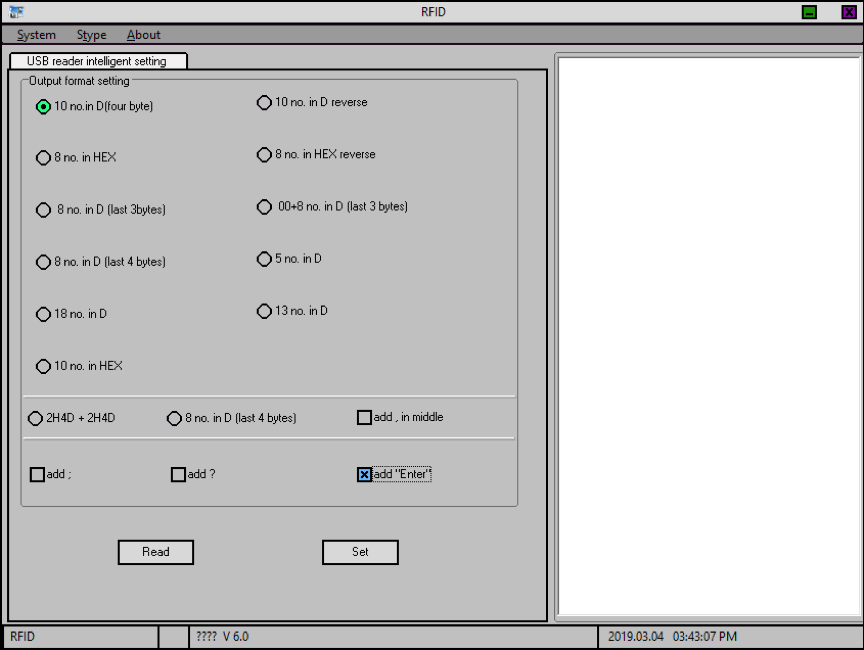
- Run the DEMO.EXE contained in the folder.
- Tick 10 no. in D (four byte)
- Click “SET”
- Open a Notepad or Word Document – Any text editor.
- Place your mouse cursor into the Text Editor
- Swipe your badge/fob over the reader
- The reader will act as a Keyboard and “Paste” the UID (Badge ID) into the text document,
- Ticking “Add enter” will move the cursor to the next line, so that you can swipe multiple fobs, quickly.
Comments
0 comments
Please sign in to leave a comment.