
Authentication Failure. The supplied user credentials failed validation for the requested service (1046)
This is the most common error message we see when submitting RTI (either FPS or EPS) to HMRC.
“Authentication Failure. The supplied user credentials failed validation for the requested service”. (1046)
If you get this error, it means HMRC have received your submission but are rejecting it because either your PAYE scheme references are incorrect, the Government Gateway User ID and password is wrong or your PAYE scheme is not set up in your business account or with HMRC correctly.
There are only 4 things within our software that would cause the error message from HMRC and it would be due to them being incorrect:
Are your Government Gateway Credentials correct?
To submit information to HMRC, Chronicle Payroll Payroll needs your HMRC Government Gateway login details.
When you log into your HMRC account to view your PAYE account, you would normally log into this page:
It is these exact details that need to be entered into Chronicle Payroll Payroll.
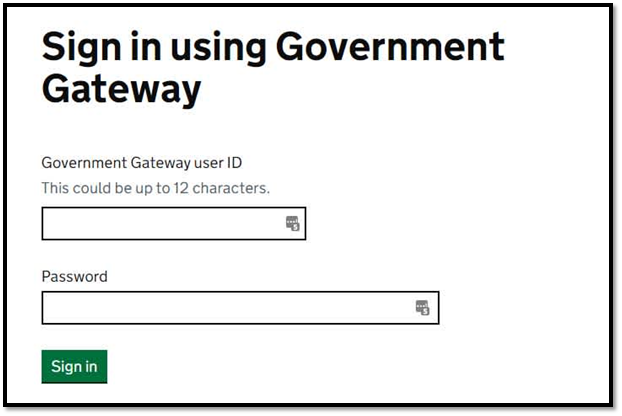
This will be different from your personal tax gateway account ID and password. You may have had to set up a new government gateway ID and password if you didn't have a business account before.
Go to Company Setup within Chronicle Payroll Payroll and select Government Gateway Credentials. Check that the User ID is the same. It is normally up to 12 digits long.
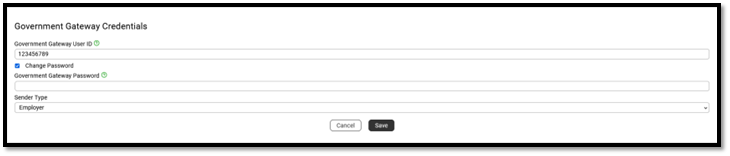
We don't show you the password you entered for security reasons. It is worth entering your password again in case you made a mistake the first time. Select 'Change Password' and put in your government gateway password.
If you change your government gateway password on the HMRC site you will need to update it in Chronicle Payroll as well.
Is your browser auto-filling the password in the government gateway box?
Sometimes you might use your browser to store your passwords. This can mean that when Chronicle Payroll asks you to put in your password for your government gateway, the browser thinks it's asking for your Chronicle Payroll password and will try and auto-fill the password box for you. Make sure you edit the password and type the password in, rather than letting your browser fill it in for you.
Can you log into the Government Gateway?
Head over to the Government Gateway and check you can login with the user ID and password you entered into Chronicle Payroll. If you can't, you need to find the correct details or reset the password in your government gateway. If you can't log in, have a look at HMRC signing in problems.
Further issues to review:
Below are some areas you can check that might be stopping your RTI's from submitting. These are the most common reasons we have been told by customers have caused their RTI's to fail.
Is your business account linked to the PAYE scheme?
Once you are logged into the HMRC government gateway, check that you can see the PAYE scheme details for your company. If you can’t see these you might be using the wrong user ID and password, maybe your personal credentials or those for another company. Or maybe the PAYE scheme is not active yet as you have only just registered.
HMRC have a YouTube video showing how to link a tax to your government gateway: HMRC - How do I add a tax to my Business Tax Account?
Is your PAYE scheme new?
If you have recently registered for PAYE you will need to activate your scheme. It can take several weeks for HMRC to send you an activation code, once received you will need to go through their activation process before you can file RTI.
Are you trying to file for the correct company?
Are the Accounts Office Reference and PAYE Reference that you can see in the Government Gateway the same as the ones you entered Chronicle Payroll? If not then you are trying to file for the wrong company and it won’t work.
Has your PAYE scheme been active for months but not used?
If the account has been activated but not used (you can see the scheme in your business account), HMRC may have made the PAYE scheme dormant. You will need to contact HMRC to get them to reactivate the scheme. Once they have done this, it can take a few hours before their system updates to allow you to submit the FPS or EPS.
Has HMRC closed your PAYE scheme?
Sometimes, if you were previously using the scheme but then have stopped for some time, HMRC might assume that the scheme is no longer active and will close it. Again you will need to contact HMRC to get them to reactivate the scheme.
Are you an Agent?
Are you trying to file on behalf of a client? Does your agent government gateway credentials have access to that clients PAYE scheme to enable you to file on their behalf. Have a look at HMRC PAYE for Agents services for more details.
Comments
0 comments
Please sign in to leave a comment.