
Year-End Guide
Year-end becomes available once you have completed all pay runs for the year and is available towards the end of March to enable you to get ready for the new tax year on the 6th of April. On your home screen, a box will appear for you to complete year-end.
Process Year-End
Once you are ready to complete Year-End, select Start Year End. You can also find Year-End under Company Setup in the side menu.
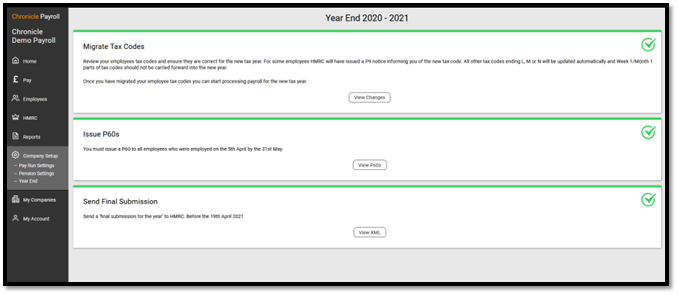
Make sure you have submitted all your FPS and EPS for the year as once you run year-end, you will be sending an EPS to HMRC to indicate you are finished for the current tax year.
If you later need to correct errors in your payroll after your final EPS submission, you can send an Additional Full Payment Submission.
Migrate Tax Codes
For the start of a new tax year, tax codes are changed and the W1/M1 flag needs to be removed. Here is where you will make the changes and apply them to your employees in one go.
Sometimes HMRC issues a P9 tax code notice for an employee where there is a difference from the current year. For example, an employee may have been on a lower tax code, but for the new year will be on the standard tax code.
If you have a paid subscription and you have set up your HMRC account to receive tax code notices online, the year-end process will check for any P9 notices and apply them.
If you are a free customer and do not receive tax code notice changes through Chronicle Payroll, you will need to go into your government gateway account or check for a letter from HMRC informing you of any tax code changes. You can then apply the changes in the migrate tax code section.
Once applied you can review all the tax code changes and edit if necessary.
Issue P60s to your employees
This is for all employees who are working for you on the last day of the tax year (5 April). The P60 summarises an employee’s total pay and deductions for the year.
A P60 needs to be issued to your employees by 31st May.
Options:
- Download P60s - We use an HMRC-approved 'substitute' P60. This can be printed on a blank sheet of paper.
- Email P60s - Available with a paid subscription.
Create an EPS Final Submission
This submission will tell HMRC that you are finished with this tax year and not to expect any more submissions. Needs to be submitted to HMRC by the 19th of April.
EPS Employment Allowance Claim for the new tax year
If you claimed the employment allowance in the previous tax year, a new EPS claim will be generated for you at year-end. You need to apply to HMRC every year to indicate you are eligible for the employment allowance.
Note: You can start the new tax year once you have completed the tax code changes. You can come back later to issue the P60s and make your submissions to HMRC.
HMRC Further Guidance
Comments
0 comments
Please sign in to leave a comment.